
The working journal / AI architecture
When not to use OutSystems for AI, and what to do instead
Where OutSystems fits in an AI application, when a separate service is worth the complexity, and when a simpler solution is enough.
An AI project does not have to choose between OutSystems and everything else. A better question is which parts of the work belong there. The application people use, the rules that control a decision, and the model that drafts an answer have different responsibilities.
OutSystems is a useful home for business workflows, review screens, and integrations. Specialized document processing or model experimentation may belong elsewhere. The aim is to put each responsibility where the team can build, test, and maintain it with the least unnecessary work.
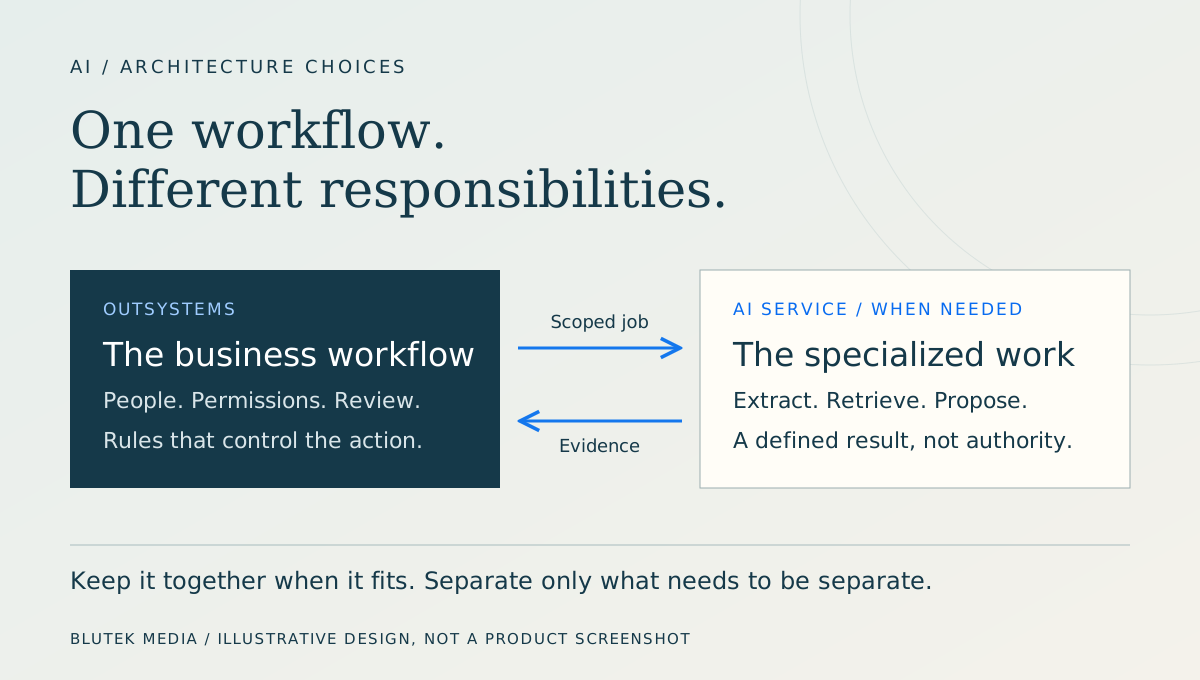
Where OutSystems fits
Consider a support team that already works in an OutSystems application. An assistant drafts a response, a reviewer checks the sources, and an existing operation sends the approved message. Keeping that experience in the application avoids a second login, a second queue, and another copy of the business rules.
OutSystems Developer Cloud (ODC) supports connections to external model providers and custom model connections. Calling an external model does not, by itself, require a separate AI backend. The available integration may already cover the task.
ODC and OutSystems 11 (O11) are different offerings. Capabilities, limits, availability, and licensing need to be established for the version and environment being used. ODC documentation should not be treated as an O11 specification.
Documentation: OutSystems: adding AI models (official documentation source)
1. Early experiments
If the unresolved question is whether a model can extract the right fields from your documents, a complete business application is not the first thing to build. Start with representative files, expected results, and a small test harness. Use synthetic or approved data rather than an unreviewed production export.
A script or notebook suits library and model experiments; an OutSystems prototype may be quicker for a team already working there. Keep the evaluation cases so they become regression checks.
Moving the workload to Python or another external runtime does not inherently improve model quality. Architecture determines how processing is hosted, secured, and recovered. Evaluation establishes whether its output is useful. For extraction, measure field accuracy, missing fields, false positives, and whether the cited page actually supports the value. Track latency and cost per document alongside those results.
A more flexible runtime can make a better pipeline possible. It is the pipeline and its measured results, not the language choice, that justify the change.
What would you build?
A team needs an AI document-review tool. They already use OutSystems, but the AI workflow is still changing. You have six weeks to test it with real users.
- Six-week pilot
- Two developers
- Sensitive documents
Your call. Pick an approach.
Keep it in OutSystemsBuild around the platform the team already knows.
Use the familiarity. Check the fit.
Reuse the existing screens, permissions, and delivery process. Prototype the uncertain extraction behavior before building the rest of the pilot.
The tradeoff to own
The commercial assessment needs to include applicable agent-execution allowances and model-provider charges.
Build a focused custom applicationGive the pilot its own interface and AI service.
More control. More to own.
A narrow custom pilot is useful when the AI experience itself is the experiment. Limit it to one document type and one review task.
The tradeoff to own
Those two developers will also own authentication, deployment, monitoring, and support, so identify what they can reuse.
Separate the workflow from the AIKeep the existing app; put the changing AI logic behind an API.
Keep the workflow. Isolate the experiment.
Keep the OutSystems review screen and place the changing processing behind an API. This is a practical option when a library or deployment requirement calls for a separate runtime.
The tradeoff to own
The boundary needs authenticated document access, defined timeouts, retries, and a versioned response contract.
2. Specialized runtimes
“AI workload” covers several different things. Simple inference may be a single model API call. RAG adds retrieval and evidence handling. Document extraction introduces parsing and field validation. Agent execution adds tool calls and action control. Fine-tuning and specialized model workflows can require their own training libraries and infrastructure.
The case for an external service becomes stronger as those dependencies, processing steps, observability needs, and infrastructure requirements grow.
Suppose the team needs a particular Python document library, a GPU-backed inference server, or an independently deployed retrieval pipeline. For this kind of workload, I would put the processing outside OutSystems and keep submission and review in the application.
Define the request and response, caller permissions, versioning, and failure ownership. A separate service should resolve a concrete requirement, not merely make the architecture diagram look more complete.
3. Asynchronous processing
A large document may need text extraction, several model calls, and validation. Keeping the browser waiting through the whole sequence makes recovery harder when a connection drops. The job should continue without the original page remaining open.
ODC lists a 60-second execution timeout for an exposed REST API method. That is a limit on that method, not every OutSystems operation or an equivalent O11 limit. The processing design must account for the limits of each step.
Accept the work, return a job identifier, and expose pending, completed, or failed status. Use a supported platform background mechanism or an external queue and worker according to the workload. In either case, define retry limits, cancellation, and duplicate-submission behavior.
Documentation: OutSystems system requirements for ODC
Supplier document example
Imagine a team already using OutSystems for supplier requests. It wants AI to suggest fields from uploaded documents, and its chosen extraction library requires a separate Python environment. The initial scope is a draft for review, not automatic supplier approval.
I would keep request ownership and approval in OutSystems. An authenticated worker would receive access only to the document assigned to its job and return proposed fields with source references.
5. Simpler solutions
An internal team that occasionally needs document summaries may be better served by an approved existing product. Its data handling, access controls, and workflow fit are the useful comparison points.
Other tasks belong in deterministic application logic. Totals, required-field checks, and fixed approval thresholds should be calculated and enforced by ordinary, testable code. Probabilistic AI output can help interpret messy inputs or draft an explanation; it should not become the authority for an exact amount or an enforceable rule.
That may lead to a smaller OutSystems feature without AI. Compare recurring costs across platform capacity, model calls, retries, storage, monitoring, review effort, and support. Include the work of operating a separate service in that comparison.
6. Permission boundaries
A model response is not proof that someone may view a record, approve a request, or send a payment. Keep authorization and current-state checks in the operation that performs the action, whether it runs in OutSystems or another trusted service.
The model proposes; application logic validates the proposal and requires review where appropriate. Giving an agent access to a tool does not establish that every user request is entitled to invoke it.
OWASP’s guidance on Excessive Agency explains the risks of excessive tool access, permissions, and autonomy.
Documentation: OWASP: Excessive Agency
7. Agent Workbench economics
Agent Workbench introduces an OutSystems execution-capacity consideration alongside the external AI provider bill. The published capacity policy uses Agent Executions, not tokens or completed business tasks. Calling everything an “AI transaction” obscures that distinction.
The policy lists 10,000 Agent Executions per month under ODC and directs customers to their account team for additional capacity options and pricing. The pricing page provides custom quotes rather than a universal per-execution rate. Use the signed entitlement, applicable promotional terms, and renewal pricing for a financial projection.
OutSystems also states that customers pay external AI providers directly for model-token consumption. A cheaper model can reduce that bill without reducing the required agent-execution capacity.
An ordinary server-side API integration or dedicated AI service can run without invoking Agent Workbench. The architectural inference is that work entirely outside its runtime avoids consuming its agent-execution allowance; the metering of the proposed integration should be confirmed with OutSystems. An external model called by a Workbench agent is still part of the Workbench execution path.
For frequent, simple tasks requiring little orchestration, that distinction deserves attention. Workbench’s orchestration, monitoring, and governance should be weighed against the cost of providing those capabilities separately. The OutSystems application subscription and model charges remain part of the comparison.
| Execution path | OutSystems cost to establish | Other costs |
|---|---|---|
| Agent Workbench with an external model | Application subscription, included executions, and quoted additional execution capacity | Provider tokens, data services, review, and support |
| Direct server-side model API without Workbench | Application subscription and ordinary platform capacity; confirm that no metered agent is invoked | Provider usage, retries, security, evaluation, and monitoring |
| Separate AI service without Workbench orchestration | Any OutSystems application and integration capacity still used | Model usage or hosting, infrastructure, observability, and maintenance |
Compare total cost per useful completed business task, not just token price. No customer-specific rate or guaranteed saving is assumed here.
Documentation: OutSystems resource capacity policy: Agent Executions; OutSystems pricing and editions; OutSystems FAQ: who pays for LLM token consumption?
A volume check
Suppose a measured workflow averages three counted agent executions per request and handles 5,000 requests a month. That produces 15,000 executions. With an applicable allowance of 10,000, the remaining 5,000 require a capacity discussion and quote.
This is a planning example, not an OutSystems metering rule. Establish how retries, agent handoffs, failed attempts, and development or test runs are counted, how capacity is pooled, and what happens at the limit. A user request, model call, and billable agent execution are not interchangeable units.
For the same workload outside Workbench, estimate provider usage, infrastructure, engineering, and support, including equivalent access controls, traces, evaluation, and recovery. Compare both estimates at the same output quality and review burden. A cheaper run that produces more correction work may cost more per completed document.
Choosing the boundary
A failed requirement matters more than a long list of features the project does not need.
- Establish model, data-location, retention, and access requirements.
- Exercise slow responses, bad outputs, unavailable providers, and duplicate requests.
- Name the owners of the workflow, AI evaluation, and production support.
- Record what would justify changing the architecture, such as another consumer or a specialized processing requirement.
| Approach | Worth considering when | Responsibility to accept |
|---|---|---|
| OutSystems with a supported AI integration | One business application; the integration meets the task | Platform-specific implementation and model evaluation |
| OutSystems plus a dedicated AI service | Specialized processing or shared AI behavior warrants separation | Another deployment, service contract, and support path |
| Existing product or small standalone tool | A bounded task does not need a custom business workflow | Less control over experience and integration |
Common questions
Do we need to leave OutSystems to add AI? No. A supported integration may fit the existing workflow without a separate backend.
Is custom code better for AI? It gives control over libraries and runtime behavior. Output quality still has to be demonstrated against the task.
What stays outside the model? Authorization, exact calculations, and enforceable business rules. Generated text must not bypass them.
Sources and further reading
- OutSystems resource capacity policy: Agent Executions
Published monthly agent-execution allowance and the process for requesting extra capacity. Checked September 21, 2026; verify your contracted entitlement.
- OutSystems pricing and editions
Custom quotes, application and user scope, and advanced add-ons; not a public flat per-execution price.
- OutSystems FAQ: who pays for LLM token consumption?
External-model token consumption is billed by the selected AI provider, separately from OutSystems capacity.
- OutSystems: adding AI models (official documentation source)
ODC model-provider connections, custom connections, and setup requirements. Check availability for your environment.
- OutSystems system requirements for ODC
Platform limits, including the exposed REST API method timeout discussed above. These are ODC-specific, not universal O11 limits.
- OWASP: Excessive Agency
Why AI tool permissions, action scope, and approval boundaries need explicit controls.
- Blutek low-code work and technical writing
Our OutSystems components and related engineering articles.
Share this article
Continue the conversation
A question, a different experience, or an idea for the next article? Send Jason a private response.