
The working journal / Healthcare / AI architecture
Healthcare chatbots: semantic search, RAG, or both?
Choosing retrieval for a small care office, a 5-10-location practice, or a health system. Azure AI Foundry, federated sign-in, and document-level permissions explained.
A front-desk colleague needs the current referral form. A nurse working across two clinics needs to compare their approved discharge workflows. A care team needs the latest information for a particular patient. All three questions might arrive in the same chat window. They should not all follow the same path to an answer.
This guide compares semantic search, retrieval-augmented generation (RAG), and semantic search plus RAG for a small care office, a regional practice with 5-10 locations, and a large health system. It uses Azure AI Foundry, now called Microsoft Foundry in the linked documentation, with Azure AI Search. The starting point is the work, not the size of the model.
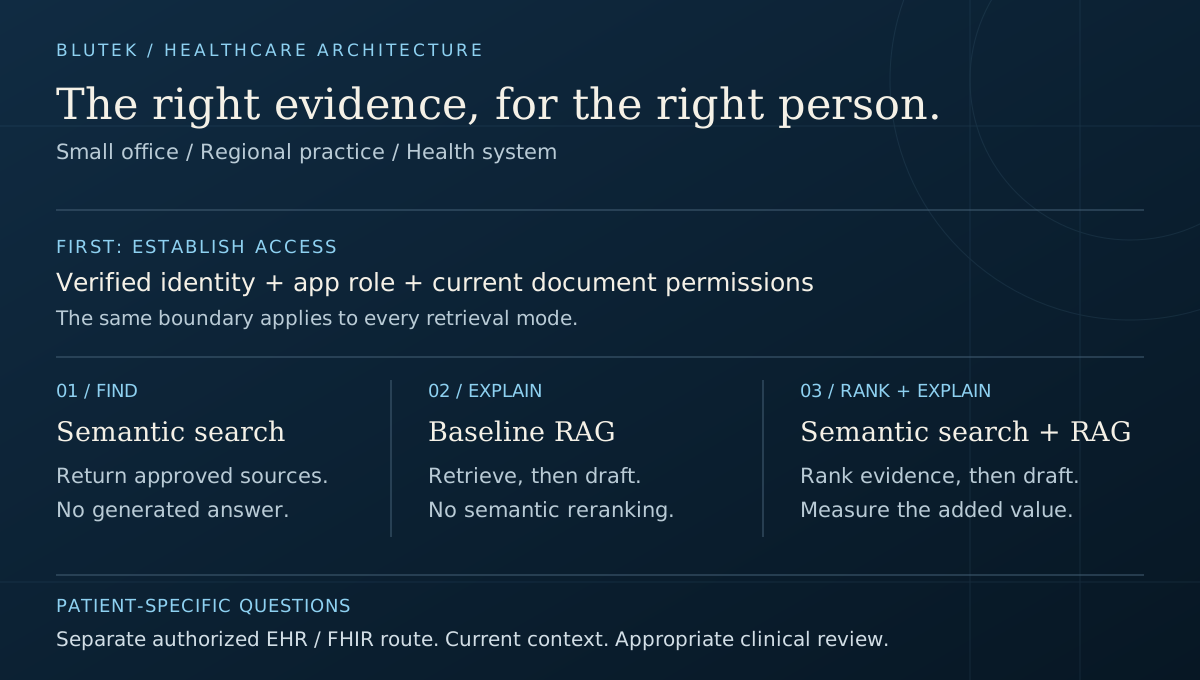
1. Three choices, not three competing products
RAG is a pattern: retrieve evidence, then give that evidence to a model to help generate a response. Semantic search helps find material by meaning. They are not opposites. A RAG application always needs a retrieval step, but that step can be keyword search, vector retrieval, a curated lookup, or a combination.
Azure AI Search also has a specific feature called semantic ranking. It reranks an initial text or hybrid result set. Its captions and answers are extracted from source text, not newly composed chatbot answers. In this comparison, "RAG without semantic reranking" means a useful baseline, not generation without retrieval.
| Mode | Retrieval and output | Good first test |
|---|---|---|
| Semantic search only | Meaning-aware retrieval, optionally with Azure semantic ranking; return passages and links. No chat-model generation. | Find the approved care instruction sheet or referral policy. |
| RAG without semantic reranking | Keyword, vector, or hybrid retrieval supplies evidence to a Foundry model. The model drafts an answer with citations. | Explain one well-bounded workflow from a small, curated library. |
| Semantic search + RAG | Hybrid retrieval and semantic ranking select evidence before a Foundry model drafts a cited answer. | Explain a process spread across several approved documents with different wording. |
An exact policy number may be better served by ordinary keyword lookup. Do not add a semantic or generative step just because the interface looks like a chatbot.
Documentation: Microsoft Foundry: retrieval-augmented generation; Azure AI Search: semantic ranking; Azure AI Search: hybrid retrieval
2. Start with the inquiry, especially when it concerns care
Separate finding a source, explaining a process, and making a patient-specific decision. A polished response can hide that distinction. Make the route visible: "approved document," "draft explanation," or "patient record lookup." A source citation supports checking; it does not certify that a response is clinically correct.
For a care-related workflow, keep the approved source, owner, effective date, location, and audience together. A retired instruction sheet and a current one may be nearly identical to an embedding model. Relevance alone cannot decide which is safe to use.
| Question | Starting approach | Boundary to preserve |
|---|---|---|
| "Where is the current referral form?" | Search and a direct source link. | Return the approved version for this location, not a generated replacement form. |
| "What does our approved follow-up workflow require?" | RAG over the current workflow, if a summary helps. | Cite the source and identify scope. Do not invent missing steps. |
| "How does the discharge process differ at clinics A and B?" | Semantic search + RAG if baseline retrieval misses relevant passages. | Compare only locations the staff member may access; keep exceptions explicit. |
| "What does the latest result mean for this patient?" | An authorized clinical workflow and current EHR data, not a general document bot. | Patient context and clinician review are required; retrieval is not a diagnosis or treatment decision. |
This is software architecture guidance, not medical advice. Any patient-facing or clinical decision-support use requires separate clinical safety evaluation and appropriate professional oversight.
3. Small office, regional practice, large health system
A small office may have little IT capacity but still handle highly sensitive information. A regional practice may have only a modest library, yet complex location rules. A health system may have a huge archive, while a particular chatbot needs only one specialty's approved documents. Size helps plan ownership and capacity; it does not pick the answer mode for you.
- Small office: name a document owner and a support owner. If a maintained knowledge page solves the task, that may be the better first investment.
- Regional practice: distinguish organization-wide guidance from local exceptions. A float nurse may have several site memberships; a local receptionist may have one.
- Large organization: budget for ingestion failures, permission changes, isolation requirements, observability, review queues, and operational ownership, not just model tokens.
| Care setting | Illustrative library and inquiries | A sensible starting point |
|---|---|---|
| Small care office / one location | 50-300 approved documents: forms, referral instructions, staff procedures, and patient education handouts. | Start with well-organized search. Trial baseline RAG for one repeated explanatory task if source links alone are not enough. |
| Regional practice / 5-10 locations | 1,000-10,000 documents: shared policies plus local workflows, specialty material, and duplicate versions. | Compare baseline RAG with semantic-ranked hybrid RAG. Make location and specialty scope explicit before expanding the pilot. |
| Large health system | 50,000+ documents across hospitals, specialties, archives, and source systems. | Scope by audience and source ownership first. Evaluate hybrid + semantic ranking for heterogeneous content, but keep direct search for source-finding tasks. |
These document ranges are fictional planning examples. Ten long scanned manuals can be harder to retrieve from than a thousand clean, short pages. Location count does not determine the required Azure tier.
What would you build?
A seven-location practice has shared policies and local care workflows. Staff need to find the right instruction sheet and understand differences between clinics. Which retrieval approach would you pilot first?
- One scoped pilot
- Staff across sites
- Per-document access
Your call. Pick an approach.
Return the approved sourcesUse search without generating an answer.
The document may be the best answer.
A strong first option for finding the current referral form or instruction sheet. Show the approved title, location, effective date, and a source link. The reader stays close to the original wording.
The tradeoff to own
The user still has to read and compare the sources. This may be enough for lookup work, but less helpful for a process spread across several documents.
Start with baseline RAGRetrieve evidence, then draft a cited explanation.
Prove the need for an explanation.
For a narrow, curated workflow, try keyword, vector, or hybrid retrieval without semantic reranking. A Foundry model can draft an explanation from the authorized evidence, with a clear route back to each source.
The tradeoff to own
Generation can omit an exception or make an unsupported claim. Measure that risk and the review burden. A small library is not automatically an easy or safe library.
Add semantic ranking to RAGRank hybrid evidence before drafting the answer.
Improve the evidence before the prose.
Worth testing when local policies use different language or the answer spans multiple approved sources. Keep both location exceptions visible and compare against baseline RAG using the same permitted documents.
The tradeoff to own
Ranking adds work, latency, and potential cost. It cannot correct stale permissions, obsolete sources, or a clinical question outside the assistant's scope.
4. Count chunks and difficult questions, not just documents
Inventory pages, usable text, chunk counts, duplicates, languages, tables, and update frequency. For example, 5,000 documents averaging 12 chunks produce roughly 60,000 indexed chunks before accounting for overlap and version retention. That is arithmetic for a capacity conversation, not a benchmark or a sizing recommendation.
Measure retrieval using questions people actually ask: an exact form code, a colloquial description, a question spanning two sources, a site-specific exception, and something the library cannot answer. Preserve table headings and section context during extraction. Treat OCR quality and conflicting versions as source problems before changing models.
Compare the three modes on the same eligible sources and access rules. Record source recall, citation support, unsupported claims, useful refusals, end-to-end latency, and cost per successfully reviewed task. Measure retrieval and generation separately so a fluent answer does not mask poor evidence.
Price the deployed Search capacity, ingestion and embedding updates, optional semantic ranking, Foundry model use, storage, monitoring, and ongoing support against current commercial terms. Search without generation avoids chat-model calls for answers; it does not make indexing or the retrieval service free. Add a layer only when its benefit is worth its latency and operating cost.
5. SSO gets you through the door, not into every document
Federated sign-in tells the application who authenticated. Authorization decides what that person may read now. For an Entra-backed API, validate the access token with a supported authentication library, including signature, issuer, audience, expiry, and allowed tenant. Do not treat a decoded token, an email address, or a browser-supplied group list as proof.
In this design, an application role such as Knowledge.Reader permits entry to the retrieval feature. Source-derived user and group grants determine document scope. These are AND conditions: being allowed to use the chatbot does not bypass document permissions. Application roles are not the same as tenant directory administrator roles.
For Entra identities, use tenant and object IDs rather than display names. When another identity provider federates into Entra, map to the validated Entra identity; for a separate federation model, maintain an explicit issuer-and-subject mapping to canonical principals. Never assume equal email addresses mean equal access.
Resolve group membership through a trusted path. A missing groups claim can indicate group overage rather than no membership. If required membership cannot be resolved, fail closed. Test guest identities and the direct or transitive membership semantics your policy actually needs; a renamed group should not silently become a new permission.
| Control | Meaning | What it must not mean |
|---|---|---|
| Knowledge.Reader application role | May use the knowledge retrieval endpoint. | May read every document in the organization. |
| Clinic A and nursing group grants | May read documents whose approved effective ACL grants those identities access. | Any document mentioning Clinic A is automatically authorized. |
| Current source policy | Resolves restrictions, combinations, exceptions, and revocations before granting access. | A flat group OR reproduces every complex source policy. |
| Patient-specific authorization | Uses the clinical system's current access rules and relevant patient context. | A clinician role or employment relationship alone allows every patient record. |
Documentation: Microsoft Entra: application roles; Configure group claims and application roles; Group claims in federated applications
6. Put a trusted retrieval boundary in front of Foundry
The proposed path is: staff sign-in, trusted backend authorization, permission-scoped Search query, current document access check, then a Foundry model call if the task needs generation. Keep the raw Search endpoint and its credentials out of the browser. The model may propose a question; it must not choose the tenant, groups, or access filter.
A Foundry project role or a managed-identity connection to Search controls service access. It is not proof that the person chatting can read every indexed document. Verify end-user identity propagation for the exact agent tool and API version you use. Where it cannot enforce your policy, use a controlled retrieval service rather than handing an agent an unscoped index.
Keep access context per request. Do not rewrite a shared agent's filter when each person signs in: concurrent users could inherit each other's scope. If a tool accepts a filter, compose it from trusted authorization context and intersect any user-selected refinements with that scope.
Documentation: Connect Azure AI Search to Foundry agents; Microsoft Foundry role-based access
7. Store permission metadata beside every vector
The example below is for an approved staff knowledge library, not a patient-record index. Each chunk contains text, an embedding, a document identifier, version information, and an effective allowlist. Tenant, readiness, and permission fields are filterable metadata. Do not embed an access rule into prose and expect vector similarity to enforce it.
At ingestion, resolve the source's effective read policy and copy it to every child chunk. The u: and g: prefixes distinguish normalized user and group IDs. This example supports effective allow grants; raw deny rules, nested conditions, or "site AND specialty" rules must be resolved by an authoritative policy service or modeled explicitly. Putting two groups in one allowlist means either group can match, not that both are required.
An empty allowlist grants nothing. Shared documents need an explicit approved all-staff principal, not a wildcard fallback. Chunk keys must be unique across the index, including across tenants. aclState and aclVersion are application-managed fields; Azure does not make them current automatically. Mark unverified or partially refreshed content unavailable. The 1536 dimensions must match the embedding deployment; they are an example, not a universal setting.
REST schema target: 2025-09-01. This is the application-managed security-filter pattern, not the separate native preview ACL schema. Hiding metadata with retrievable: false is data minimization, not authorization.
Inspect the chunk-level vector schema
{
  "name": "governed-chatbot-chunks",
  "fields": [
    { "name": "chunkId", "type": "Edm.String", "key": true },
    { "name": "documentId", "type": "Edm.String", "filterable": true },
    { "name": "tenantId", "type": "Edm.String", "filterable": true, "retrievable": false },
    { "name": "title", "type": "Edm.String", "searchable": true },
    { "name": "content", "type": "Edm.String", "searchable": true },
    { "name": "sourcePath", "type": "Edm.String" },
    { "name": "sourceVersion", "type": "Edm.String", "filterable": true },
    { "name": "updatedAt", "type": "Edm.DateTimeOffset", "filterable": true },
    { "name": "aclVersion", "type": "Edm.String", "filterable": true },
    { "name": "aclState", "type": "Edm.String", "filterable": true, "retrievable": false },
    { "name": "isActive", "type": "Edm.Boolean", "filterable": true, "retrievable": false },
    {
      "name": "allowedPrincipals",
      "type": "Collection(Edm.String)",
      "searchable": false,
      "filterable": true,
      "retrievable": false
    },
    {
      "name": "contentVector",
      "type": "Collection(Edm.Single)",
      "searchable": true,
      "retrievable": false,
      "dimensions": 1536,
      "vectorSearchProfile": "content-profile"
    }
  ],
  "vectorSearch": {
    "algorithms": [
      { "name": "content-hnsw", "kind": "hnsw", "hnswParameters": { "metric": "cosine" } }
    ],
    "profiles": [
      { "name": "content-profile", "algorithm": "content-hnsw" }
    ]
  },
  "semantic": {
    "configurations": [
      {
        "name": "content-semantic",
        "prioritizedFields": {
          "titleField": { "fieldName": "title" },
          "prioritizedContentFields": [{ "fieldName": "content" }]
        }
      }
    ]
  }
}
Documentation: Azure AI Search: create a vector index; Create Index REST reference: 2025-09-01; Azure AI Search: security filter pattern
8. Build the access filter on the server
The query builder assumes that a trusted authentication and policy layer has already verified the caller, checked the tenant, resolved complete group membership, and supplied the application roles. None of those values may come directly from form fields, request JSON, or model tool arguments. The function deliberately refuses incomplete authorization context.
It combines the tenant boundary, active content, ACL readiness, and principal membership before returning candidates. Hybrid retrieval uses both text and vectors; semantic ranking then helps order the evidence. preFilter constrains vector candidate search. Search-side postFilter is not the same as hiding a forbidden passage after it has already entered a model prompt.
The filter is a first boundary, not proof that the index reflects a permission change made a second ago. Before passing text to Foundry, reauthorize each returned document against a current trusted policy snapshot and its ACL version. Drop stale or unauthorized evidence; if authorization is unavailable, do not generate from it. Source links need access checks too.
This is a teaching example, not a complete authentication service or a deployed Azure integration. For a controlled baseline comparison, retain the same access filter and retrieval inputs, remove semantic query settings, and evaluate the resulting evidence before generation.
Inspect the illustrative TypeScript query builder
Download the TypeScript example
/**
 * Illustrative query builder, not an authentication implementation.
 * POST /indexes/governed-chatbot-chunks/docs/search?api-version=2025-09-01
 *
 * Call only from a trusted backend after token validation, tenant checks,
 * and complete group resolution. Never populate access directly from
 * request JSON or model-generated tool arguments. Types are not proof
 * of authorization; the trusted backend must establish these values.
 */
export type TrustedAccessContext = {
  tenantId: string;
  userOid: string;
  groupOids: readonly string[] | null;
  groupsComplete: boolean;
  appRoles: readonly string[];
};

function normalizeId(value: string): string {
  const uuid = /^[0-9a-f]{8}-[0-9a-f]{4}-[0-9a-f]{4}-[0-9a-f]{4}-[0-9a-f]{12}$/i;
  if (typeof value !== "string" || !uuid.test(value)) {
    throw new Error("Expected a canonical UUID");
  }
  return value.toLowerCase();
}

export function buildQuery(
  question: string,
  vector: readonly number[],
  access: TrustedAccessContext,
) {
  if (!access || !Array.isArray(access.appRoles) ||
      !access.appRoles.includes("Knowledge.Reader")) {
    throw new Error("Knowledge retrieval is not permitted");
  }
  if (access.groupsComplete !== true || !Array.isArray(access.groupOids)) {
    throw new Error("Access scope could not be resolved");
  }
  const tenant = normalizeId(access.tenantId);
  const principals = ["u:" + normalizeId(access.userOid)];
  for (const group of access.groupOids) {
    principals.push("g:" + normalizeId(group));
  }
  if (typeof question !== "string" || !question.trim()) {
    throw new Error("A question is required");
  }
  if (!Array.isArray(vector) || vector.length !== 1536 ||
      !Array.from(vector).every(value => Number.isFinite(value))) {
    throw new Error("Expected 1536 finite embedding values");
  }

  // UUID validation excludes OData quotes and list delimiters.
  const allowed = [...new Set(principals)].sort().join(",");
  const securityFilter =
    "tenantId eq '" + tenant + "' and isActive eq true " +
    "and aclState eq 'ready' and " +
    "allowedPrincipals/any(p: search.in(p, '" + allowed + "', ','))";

  return {
    search: question,
    filter: securityFilter,
    vectorFilterMode: "preFilter",
    vectorQueries: [{
      kind: "vector", fields: "contentVector", vector: [...vector], k: 50,
    }],
    queryType: "semantic",
    semanticConfiguration: "content-semantic",
    select: "chunkId,documentId,title,content,sourcePath," +
      "sourceVersion,updatedAt,aclVersion",
    top: 5,
  };
}

// Not shown: token verification, authoritative group resolution,
// embedding generation, managed-identity Search authentication,
// current document authorization checks, or Foundry generation.
// Before retrieved text enters model context, recheck access and
// ACL freshness for its documentId. Fail closed on uncertainty.
// This example is for staff knowledge, not patient-record access.
Documentation: Azure AI Search: hybrid retrieval; Azure AI Search: security filter pattern; Azure AI Search: vector query filters
9. Patient-specific care needs a separate authorization path
Approved education material is not a substitute for the current chart. A patient-specific question may require recent results, encounter context, consent, and restrictions that change independently of a staff group. Retrieve current structured data through an authorized EHR or FHIR integration with the system's relevant access controls. A broad service credential is not an end-user permission model.
Keep the general knowledge route separate from the patient-data route. Do not silently copy charts into the staff library or let a prompt select any patient identifier. Patient-facing access and staff access need separate policies. Break-glass access, if supported, belongs in an explicit controlled and audited workflow, never in a chatbot's reasoning.
A clinician-facing assistant can help locate approved guidance or prepare a source-backed draft for review. It must not imply that matching a guideline to a chart establishes a diagnosis, suitability, or treatment plan. Evaluate intended clinical use with qualified stakeholders. An Azure service name, SSO, or this schema does not establish regulatory compliance.
Documentation: Azure Health Data Services: authentication and authorization
10. Permissions must survive updates, memory, and caching
When a document is retired, replaced, or restricted, remove or quarantine every affected chunk. Track source and ACL versions together; avoid a refresh that mixes new text with old permissions. Keep revocation handling and its failure mode explicit. If the current policy cannot be checked, use a safe unavailable response rather than last-known broad access.
Do not share answer caches across users just because their questions match. Any cache needs tenant, effective permission scope, source version, and policy freshness in its validity rules. Recheck access before reusing evidence in a later chat turn; earlier permission does not last for the whole conversation.
Treat retrieved documents as untrusted inputs. A passage saying "ignore access rules" is content, not an instruction to the tool layer. Minimize sensitive prompt and response logging, restrict audit access, and verify retention and processing arrangements before introducing protected data.
Documentation: OWASP: prompt injection
11. Native permission features are a separate implementation choice
Azure AI Search also documents native document-level permission features, with preview constraints and source-specific support. Those features use a different schema contract, including permissionFilterOption and permissionFilter fields, rather than the application-owned allowedPrincipals convention above.
Where supported, a query can carry the end-user identity through x-ms-query-source-authorization. Confirm the exact API, identity propagation, supported principals, and missing-identity behavior. The agentic retrieval documentation warns that indexed knowledge-source requests without the required user identity can return unfiltered results. Reject that condition at your trusted boundary; never treat a missing token as public access.
Check the current documentation and release status before choosing native ACL features. Do not combine preview schema examples with the stable example here and assume they have the same security behavior.
Documentation: Azure AI Search: document-level access overview; Index ACLs using the push REST API; Query-time ACL and RBAC enforcement; Agentic retrieval: permissions at query time
12. A pilot should prove both usefulness and refusal
For a small office, choose one repeated question and a small approved library. For a 5-10-location practice, include at least one shared policy and two conflicting local versions. For a large organization, add cross-source and cross-tenant attempts, concurrent users, and permission-update failures. Use synthetic records and authorized test identities rather than real patient data in a casual prototype.
| Exercise | Passing behavior |
|---|---|
| A receptionist asks for a restricted clinician document. | No forbidden title, excerpt, citation, or answer reaches the user or model context. |
| A float staff member has access to clinics A and B, but not C. | Only approved A/B and shared evidence is eligible; a typed "clinic C" cannot expand permissions. |
| A required group lookup fails or a token is for another audience. | The request fails closed; there is no unfiltered retry. |
| A policy is retired or access is revoked during a conversation. | Stale evidence is excluded from retrieval, caches, and reused conversation context. |
| The question asks for a patient-specific decision unsupported by approved evidence. | The assistant preserves the clinical boundary and routes to the appropriate authorized workflow. |
| A document contains malicious tool instructions. | The retrieval and tool layers keep their original permissions and do not execute the document's instructions. |
The useful outcome is not always a longer answer. It may be a direct source link, a clear conflict, a request for context, or a safe handoff. Choose the least complex design that passes the real task and access tests.
Sources and further reading
- Microsoft Foundry: retrieval-augmented generation
RAG and the role of retrieval in grounded applications.
- Azure AI Search: semantic ranking
Reranking, extractive captions, and candidate limits.
- Azure AI Search: hybrid retrieval
Text and vector retrieval combined using reciprocal rank fusion.
- Connect Azure AI Search to Foundry agents
Current agent connection and query configuration; verify the identity path for your integration.
- Microsoft Foundry role-based access
Resource, project, agent, and consumer roles are separate from document read policy.
- Azure AI Search: create a vector index
Vector fields, dimensions, profiles, and human-readable content fields.
- Create Index REST reference: 2025-09-01
Stable API contract used for the illustrative application-managed schema.
- Azure AI Search: security filter pattern
Principal strings and filters do not authenticate the caller; the application owns that boundary.
- Azure AI Search: vector query filters
How preFilter and postFilter change candidate selection and recall.
- Azure AI Search: document-level access overview
Application filters versus native permission features, with preview status and source limitations.
- Index ACLs using the push REST API
The separate permissionFilterOption and permissionFilter schema contract.
- Query-time ACL and RBAC enforcement
End-user identity, query headers, group resolution, and permission matching.
- Agentic retrieval: permissions at query time
Identity propagation requirements and the missing-identity warning for indexed knowledge sources.
- OWASP: prompt injection
Why untrusted retrieved content must not control privileged actions.
- Microsoft Entra: application roles
Application-specific roles, role claims, and assignments to users and groups.
- Configure group claims and application roles
Group overage and trusted membership resolution.
- Group claims in federated applications
Group identifiers, federation, and token configuration considerations.
- Azure Health Data Services: authentication and authorization
Service authorization for healthcare APIs; application-specific patient access still needs a deliberate policy.
Share this article
Continue the conversation
A question, a different experience, or an idea for the next article? Send Jason a private response.