
The working journal / Inside the product
Car Deal Check: making a calculation explain itself
Follow a worked deal through trade equity, itemized charges, worksheet differences, and a repeatable payment estimate.
A payment estimate is only useful if the person reading it can understand the inputs. Car Deal Check brings the vehicle price, fees, trade, and financing terms into a worksheet that can be inspected and corrected. The important design detail is the explanation around the number.
Here is a worked example based on the public calculator's calculation rules. All amounts below are invented for explanation. They are not a dealer quote, a lending offer, or a statement about which taxes and fees apply to a particular buyer.
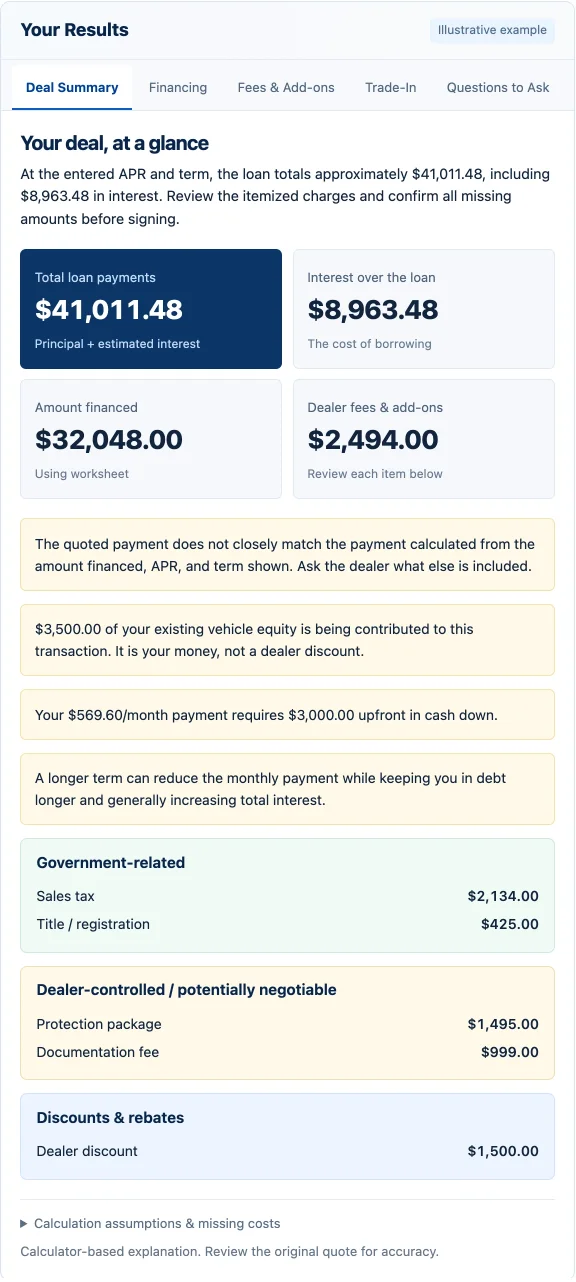
Start with a deal that can be reconciled
Imagine a selling price of $30,000 before the listed discount. Add $2,500 of entered taxes and charges, subtract a $1,000 discount and $3,000 cash down. The trade allowance is $10,000, but the old loan payoff is $12,000. That leaves negative equity of $2,000.
In this example the remaining old debt is rolled into the new loan. Subtracting negative equity increases the amount financed. The itemized estimate is therefore $30,500. If the buyer pays the old debt separately, the transaction needs different inputs. The calculator cannot infer a separate payment from a trade allowance alone.
| Input | Effect on the balance |
|---|---|
| Selling price | $30,000 |
| Entered charges and taxes | + $2,500 |
| Discount | - $1,000 |
| Cash down | - $3,000 |
| Trade allowance less payoff | $10,000 - $12,000 = -$2,000 equity |
| Rolled-in negative equity | + $2,000 |
| Itemized estimate | $30,500 |
Preserve both totals when they disagree
Now suppose the dealer worksheet says $31,500 is financed. Silently replacing it with $30,500 would hide a useful discrepancy. Car Deal Check keeps the worksheet figure and the itemized estimate separate. When a worksheet amount is supplied, it is the basis for the financing estimate; the itemized calculation provides a comparison.
The $1,000 difference does not prove an improper charge. It may reflect an omitted fee, a missed credit, or an entry error. The useful next question is: which line explains the difference? The interface should help the buyer find that line and revise the inputs.
Do not count a discount twice. The selling-price input must be the price before any discounts entered separately.
Make the payment reproducible
For an illustrative fixed-rate estimate using a 6% annual rate divided into monthly periods and 60 equal payments, $30,500 produces about $589.65 per month. Using $31,500 produces about $608.98. The formula uses the principal, monthly rate, and number of payments; it does not ask a language model to invent a payment.
These are simplified estimates. Real APR disclosures can include costs that differ from the contract interest rate, and payment timing or rounding may change the actual schedule. The lender's disclosures and signed agreement determine the terms. Comparing offers also means comparing the amount financed and loan length, not just the monthly payment.
| Basis | Monthly estimate | Total of estimated payments |
|---|---|---|
| $30,500 itemized estimate | $589.65 | $35,379.03 |
| $31,500 worksheet amount | $608.98 | $36,538.99 |
Totals use the unrounded payment before rounding the displayed total. Multiplying the displayed monthly amount by 60 can differ by a few cents.
Make missing data visible
A blank payoff is not evidence of a paid-off trade. The calculator asks for both allowance and payoff when trade information is incomplete. Elsewhere, missing charges can be treated as zero for an estimate, but that assumption appears in the result. Those are different situations and deserve different messages.
This distinction is also useful outside finance. An imported purchase order, an inventory count, or a timesheet can contain a confirmed zero or an unknown value. Treating both as the same number can make a neat summary conceal an incomplete record.
Keep the explanation attached to the calculation
The public tool offers manual entry while AI quote import is paused. The useful work remains available: enter the figures, inspect the assumptions, and compare the results. If AI import returns, extracted fields still need a human-readable handoff before they influence the calculation.
For teams building similar tools, this suggests three checks: the same inputs produce the same result; a missing input produces a visible explanation; and two conflicting totals remain inspectable. A result screen should give someone a way to investigate, not merely a number to trust.
Sources and further reading
- Use Car Deal Check
The public tool, its manual inputs, assumptions, and calculation results.
- CFPB: comparing auto loan offers
Why amount financed, rate, term, and total cost belong in the comparison.
Share this article
Continue the conversation
A question, a different experience, or an idea for the next article? Send Jason a private response.